“The more you get set into your own world, the smaller your world becomes.”
― J.R. Rim
so last time we covered how to use if statements and with just that alone you can now a lot of stuff with your programming but it’ll take quite a bit more time on the keyboard then you might like! And worse then that sometime you don’t know exactly how many times your code is gonna need to react to something. So rather then making a random guess of how many times we should do something we can use a while loop. They’re pretty simple while (This is true){repeat doing this stuff until false} now the important part is to insure that the stuff inside the brackets will eventually make the boolean statement inside the parenthesis false, if not the program will repeat everything within the brackets of the while loop FOREVER and the code will never end! Luckily most IDE’s have some sort of a stop button so you don’t have to worry about your computer blowing up. So maybe your making a game and the charter loses health if they are infected and will continue to loss health until healed, here you could use a while loop, while (infection == true){health = health – 10; }. with how fast computers are now a days your charter gonna die in a blink of an eye we regardless of their health, but you can work around that by adding a time delay into the while loop, but we having gotten there yet.
Now while loops aren’t the only way to create a loop there also for loops, basically dose the same thing but with a bit more of a retained structure, for ( initialization; boolean test; iteration expression). I’d guess most of the words in that example means almost nothing to you so lets explain them. The initialization is connecting a variable to the loop, normally the variable is created inside of the parenthesis you normally see int i= 0; but the variable DOESN’T need to start at 0 you can start it with what ever is appropriate. Now the boolean test is pretty simple if this is true keep looping through the brackets, if this is false DON’T go through the brackets, and that usually look something like i<5; finally we have the iteration expression here you can put something like i=i+1 so after the end of brackets the vaule of i will incress by 1, so after the code runs 5 time i will be greater then 5, and the for loop will come to an end. An import thing to remember is that all three of those components need to share variables of there a good chance you’ll end up with an infinite loop. But after you play around with for loops a bit you’ll quickly figure that out, soon enough you be wright code with for loops inside of for loops!
Now that we have a basic understanding of for loop and while loops we can take a look of the different variations of these loops. Like the do while loop which is really nice because it’ll run the code within it’s brackets at least 1 time regardless of the boolean statement be true or false, now if the statement is true it will then repeat it’s self until the boolean becomes false. And it’s written a little differently
- do{
- //looping code
- }while(true);
Here the looping code will run only once, but if the while was true it would continue to run until the looping code changed the boolean statement. To be honest the do while loop isn’t anything too special but it is a convenient tool.
Just like the do while loop the for-each loop is a special case of a for loop and can be reconstructed with a regular for loop. But we can use the for-each loop to save us some time digging through arrays, rather then adding some additional statements to a normal for loop to get we want we can use a for-each loop for searching through arrays.
for-each loop

for (type variable : array){
    // Statements
}

for-loop

for (int i = 0; i<array.length; i++){
     type variable = array[i];
     // Statements
}
As you can see they both do the same thing, but the for-each loop can save you some typing and little thinking, but that’s about it.
One important thing to know about loop is the break function. a wonderful tool to end loops under certain conditions, are is break. so lets say you have some if then statements inside your loop that reacts to button being clicked and want that loop to come to an end and that button gets clicked on. well you can put the break statement inside of that if then statements and if that button gets clicked the if then will run. And once the break statement runs, you’ll leave the leave loop right there and then, so any statement in the loop that follows the break statement will get skipped. remember to make sure the break and that if then is where you’ll want it in the loop. these break statements will something you’ll use a bit, so take the time to practice with them as you should do with evreything else we covered to day.
In the future we’ll probably be covering these more, but I figured I should at lest introduce the ideal of inner loops. which is what it sounds like a loop inside of another loop, with this you can start to create things in a 2 dimensional manor, must of the time probably wont be the visible x, y axis your use to. but we can can use that for an example.
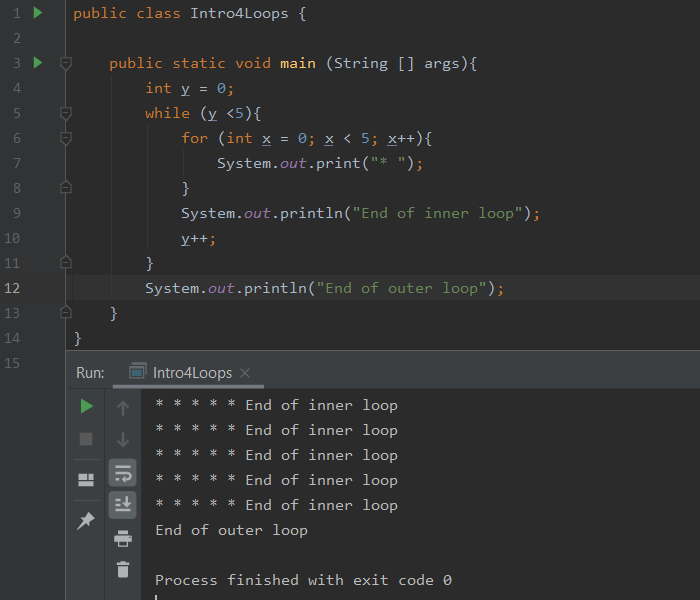
So as you can see we print 5 *’s then the inner loop ends we move down to the next line. then the inner loops repeats it’s self until the outer loop comes to an end, which happen after the inner loops runs 5 times. these types of loops are great tools for many things, maybe you’re trying to put array inside of array, I can list reason after reason but your the coder and will have to figure out how to use them.
(a quick apology for the late post this should have come sooner my mistake I’ll do my best to ensure it doesn’t happen again)
 TomAWESOME Tech