Featured

Java Introduction

“Hello World” for the Millionth Time

A journey of a thousand miles begins with a single step.

— Lao Tzu

I’m assuming you know that Java is a programming languages so we’ll start from there. There are different types of programming languages, every thing from just using different combinations of 1’s and 0’s in different patterns to clicking and dragging pictures onto a line. Some languages may be more useful than others. Java sits somewhere in the middle, it uses words numbers and other characters(1,2,3,/,%,{,},;,…) and is extremely useful. It’s a general purpose langues which allows for the code to be ran on different computers. So for example you can create a calculator program that can run on either a Macintosh computer, Windows computer, or even a computer with a Linux operating system all using the same code. As long as the machine ruining the code has JVM(Java Virtual Machine), which is a virtual machine that translate the Java code to compiled Byte-code that the computer using can then read. Heck, Java can also be used to create Android application and much more. To do some programing you’ll what to install an IDE (integrated development environment), I use Intellij, but use what you what.

Just like every other introduction to computer programming we’ll start off with a simple “Hello World!” introduction, where we can at least learn about class, methods, statements, and a few other specific things.
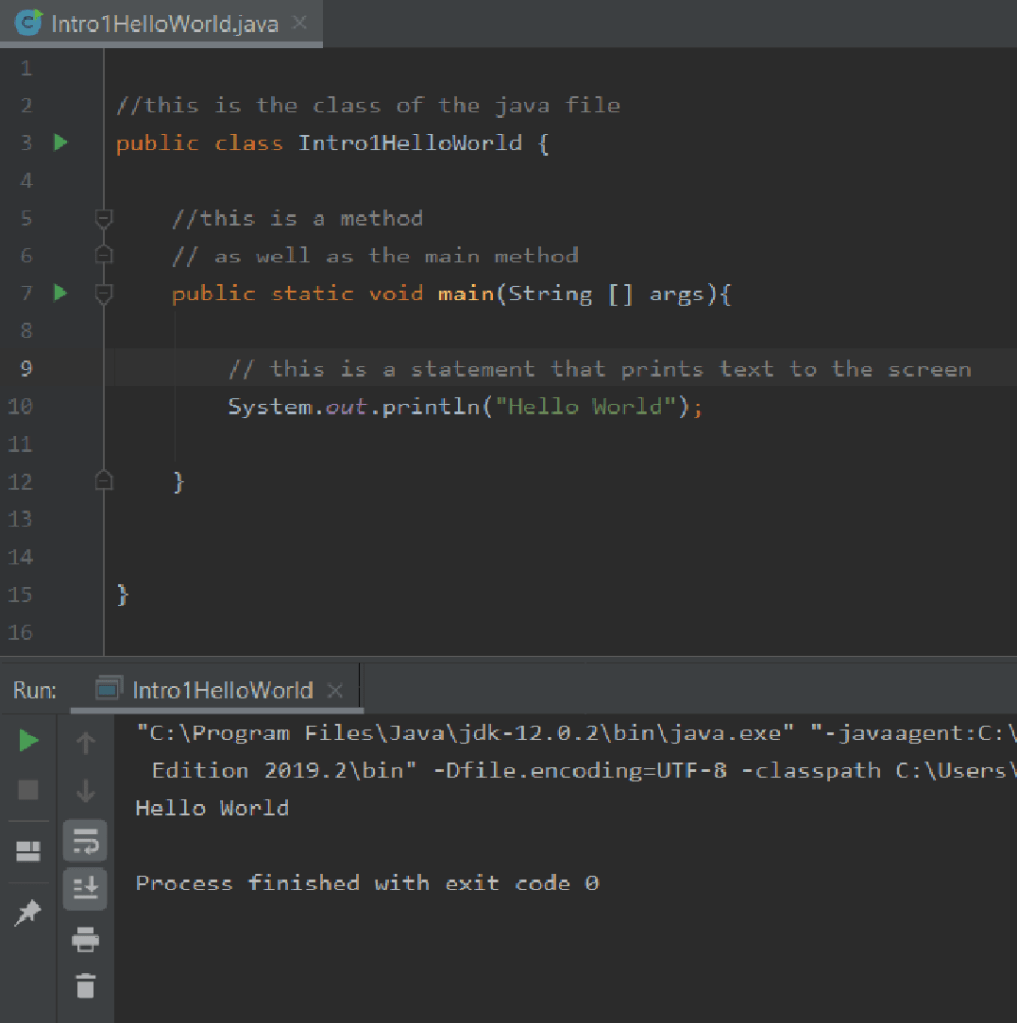
Above you can see the code that creates the text “Hello World”. only really takes 5 lines of code

  1. public class Intro1HelloWorld {
  2. public static void main(String [] args){
  3. System.out.println(“Hello World”);
  4. }
  5. }

That first line of code creates a class for the code to me written inside of. The next line is a method known as the main method, which we’ll learn a lot more about in the future. But to keep it simple its demanded to run any java code, you can have as many other classes and methods as you please but you’ll always need the main method to run the code. The third line is inside of the main method and is a statement that will display a String inside of the parentheses. The fourth line is a closing bracket for the main method and the fifth line is the closing bracket for the class and the end of our code.

All of that stuff you saw starting with “//” were only comments and has no effect on the code, you can also block out multiply line of code by placing “/*” and “*/” around the text that not intended as code. this is incredibly nice so you can make notes for both yourself and others about what and how your code is intended.

To have a light understanding of classes and methods we should learn a bit about OOP or Object Oriented Programming but that’ll be another post another time. For a quick explanation classes are how objects are created, the common example is classes are the blueprints and objects are buildings. The same blueprints can be used to make different houses multiple times, and those houses may have different properties such as the type of roofing, siding, or the color of paint. Those “houses” may be different from one another but they all came from the same “class”, the only difference is the variables of each building where assigned different values from one another while the structural integrity stays the same.

Methods are the foundation of classes(and probably the wall, roof, plumbing, and everything else lol). Methods allow for the same code to be used multiply times without needing to retype every time by just calling the method in other parts of the code. They can also return a variable but they don’t have too, but that’s something we’ll be going into another time. Since here the only example that we have is the main method I wouldn’t expect one to acquire a full understanding of methods and all that they can provide.

Statements are all the information that creates the methods. System.out.println(“Hello World”); was the only statement inside of the Intro1HelloWorld class, and this statement is held inside of the main method, when this code is ran it will display the words “Hello World” on the screen.

Now this is just a light introduction to the extremely massive world of computer programming. There is still a bit to learn before you’re programming video game, or making AI software for the stock market. But every time you advance your skill set it becomes so much sweeter wright code.
The Circle Of Loops

“The more you get set into your own world, the smaller your world becomes.”
― J.R. Rim

so last time we covered how to use if statements and with just that alone you can now a lot of stuff with your programming but it’ll take quite a bit more time on the keyboard then you might like! And worse then that sometime you don’t know exactly how many times your code is gonna need to react to something. So rather then making a random guess of how many times we should do something we can use a while loop. They’re pretty simple while (This is true){repeat doing this stuff until false} now the important part is to insure that the stuff inside the brackets will eventually make the boolean statement inside the parenthesis false, if not the program will repeat everything within the brackets of the while loop FOREVER and the code will never end! Luckily most IDE’s have some sort of a stop button so you don’t have to worry about your computer blowing up. So maybe your making a game and the charter loses health if they are infected and will continue to loss health until healed, here you could use a while loop, while (infection == true){health = health – 10; }. with how fast computers are now a days your charter gonna die in a blink of an eye we regardless of their health, but you can work around that by adding a time delay into the while loop, but we having gotten there yet.

Now while loops aren’t the only way to create a loop there also for loops, basically dose the same thing but with a bit more of a retained structure, for ( initialization; boolean test; iteration expression). I’d guess most of the words in that example means almost nothing to you so lets explain them. The initialization is connecting a variable to the loop, normally the variable is created inside of the parenthesis you normally see int i= 0; but the variable DOESN’T need to start at 0 you can start it with what ever is appropriate. Now the boolean test is pretty simple if this is true keep looping through the brackets, if this is false DON’T go through the brackets, and that usually look something like i<5; finally we have the iteration expression here you can put something like i=i+1 so after the end of brackets the vaule of i will incress by 1, so after the code runs 5 time i will be greater then 5, and the for loop will come to an end. An import thing to remember is that all three of those components need to share variables of there a good chance you’ll end up with an infinite loop. But after you play around with for loops a bit you’ll quickly figure that out, soon enough you be wright code with for loops inside of for loops!

Now that we have a basic understanding of for loop and while loops we can take a look of the different variations of these loops. Like the do while loop which is really nice because it’ll run the code within it’s brackets at least 1 time regardless of the boolean statement be true or false, now if the statement is true it will then repeat it’s self until the boolean becomes false. And it’s written a little differently

  1. do{
  2. //looping code
  3. }while(true);

Here the looping code will run only once, but if the while was true it would continue to run until the looping code changed the boolean statement. To be honest the do while loop isn’t anything too special but it is a convenient tool.

Just like the do while loop the for-each loop is a special case of a for loop and can be reconstructed with a regular for loop. But we can use the for-each loop to save us some time digging through arrays, rather then adding some additional statements to a normal for loop to get we want we can use a for-each loop for searching through arrays.

for-each loop

for (type variable : array){
    // Statements
}

for-loop

for (int i = 0; i<array.length; i++){
     type variable = array[i];
     // Statements
}

As you can see they both do the same thing, but the for-each loop can save you some typing and little thinking, but that’s about it.

One important thing to know about loop is the break function. a wonderful tool to end loops under certain conditions, are is break. so lets say you have some if then statements inside your loop that reacts to button being clicked and want that loop to come to an end and that button gets clicked on. well you can put the break statement inside of that if then statements and if that button gets clicked the if then will run. And once the break statement runs, you’ll leave the leave loop right there and then, so any statement in the loop that follows the break statement will get skipped. remember to make sure the break and that if then is where you’ll want it in the loop. these break statements will something you’ll use a bit, so take the time to practice with them as you should do with evreything else we covered to day.

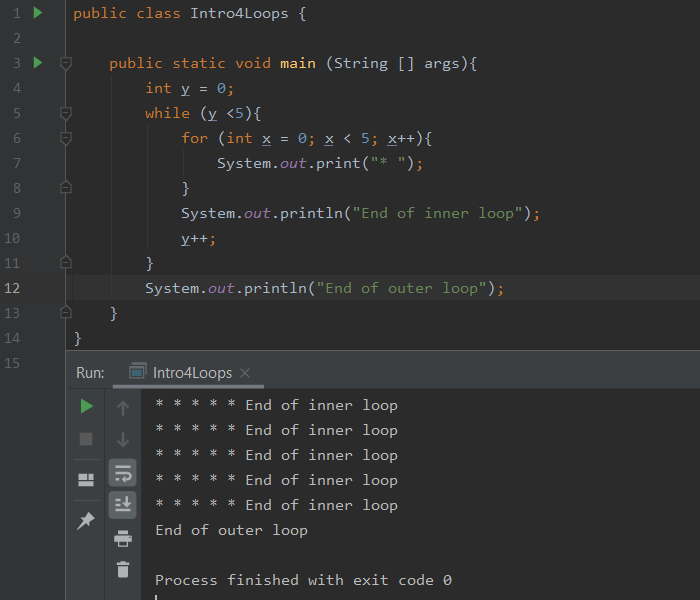
In the future we’ll probably be covering these more, but I figured I should at lest introduce the ideal of inner loops. which is what it sounds like a loop inside of another loop, with this you can start to create things in a 2 dimensional manor, must of the time probably wont be the visible x, y axis your use to. but we can can use that for an example.

So as you can see we print 5 *’s then the inner loop ends we move down to the next line. then the inner loops repeats it’s self until the outer loop comes to an end, which happen after the inner loops runs 5 times. these types of loops are great tools for many things, maybe you’re trying to put array inside of array, I can list reason after reason but your the coder and will have to figure out how to use them.

(a quick apology for the late post this should have come sooner my mistake I’ll do my best to ensure it doesn’t happen again)

If We Can Just Figure “if” Out

“Life is really simple, but we insist on making it complicated.” –Confucius

Now we can learn some more basic stuff and soon be doing some real coding. Today we’ll start of with the if statement luckily it’s pretty simple. If statements are boolean based, and basically go if this is true then do this stuff. For example if (phoneRings) { //commands for answering phone } Luckily you can use more then just boolean data types, what matters is that the what you say in side those parentheses so your gonna be using “==” instead of “=”, the double equals signs is what Java uses when it means “Equals”. Why double? Don’t ask me. so to put it a different way it’s asking the question “are these two thing the same?”. If they are the equals will be true if not false. While the single equals sign means assign and you’ve seen those used last time in the example. but for a quick review this variable represents this thing, a quick example int a = 2; this is an integer variable, we named it “a” and its ASSIGNED the value 2.

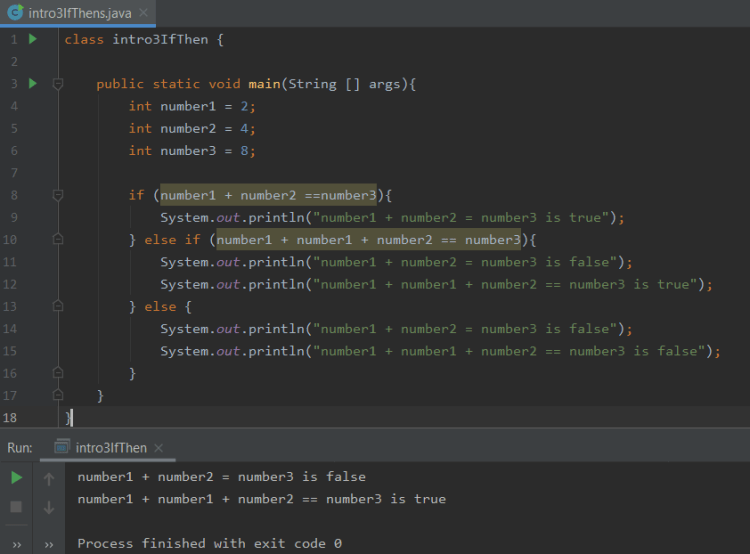
With all that we do some cool stuff, like have two number variable and check if they equal what we want them too. If (numberA + numberB == 7){ System.out.prinln( “true”);}. But we can go further then that with the else statement, which if you use it’ll follow an if statement. It runs only if the if statements are false so, if (false){//some code that doesn’t run} else { // code that will run} with this if stuff we can go a step further introducing the else if statements. If you use them they always sit in between the if statements and the else statement and you can have as many as you want.

you’ll want to make sure you order your if then’s so the least likely to be true is tested first follow by the next least and etc. until you reach the most obtainable variable which will be the last else if statement. Following that else if statement is an else statement, assuming your using all of them the only one you have to use is the if statement. Now we can have some fun with some simple code.

So next time we’ll be learning about loops for the first time. first we’ll introduce our selves to while loops, then for loops and then we’ll learn about the different types of while and for loops and under what conditions you should use them. but that’ll be next time!

A Primitive Start To Java

“Always remember that you are absolutely unique. Just like everyone else.” –Margaret Mead

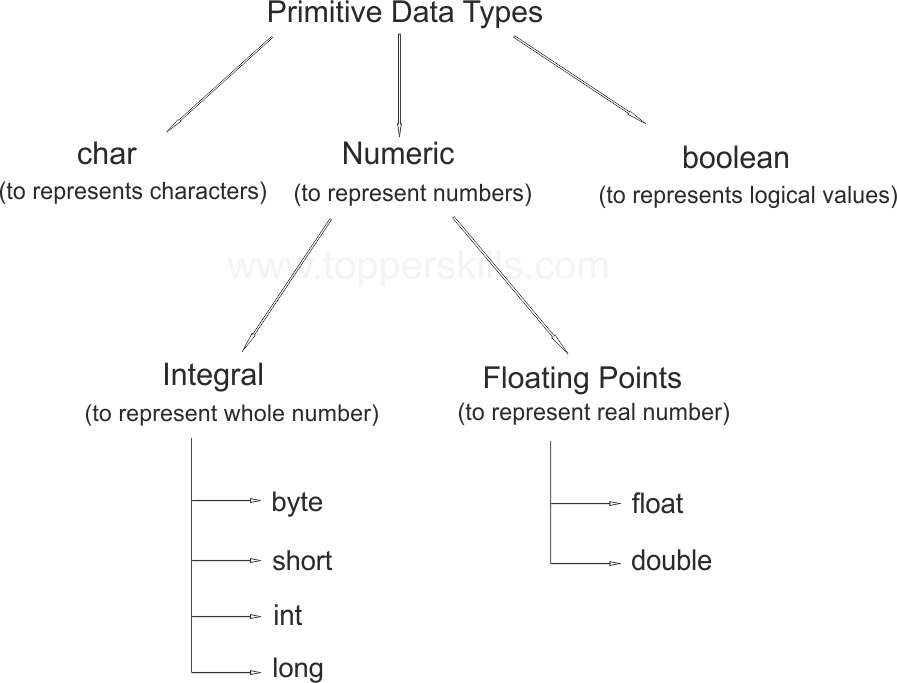
Now that we’ve covered the default “Hello World” introduction to computer programming we can began to learn the basics of Java, so we’ll start with primitive data types. Primitive Data types are like “nouns” for the language of Java, what i mean by that is that in order for an action to be made something must exist. In the future we’ll learn how to create and use new “nouns” called objects,now we’re not at the point of creating our own objects yet, but we’ll get there!

Java has eight Primitive Data type int, byte, long, short, float, double, char, boolean. Now to truly understand these we’ll need to separate these into different groups. Most of these fall into one of two numeric groups, the first group being Integral and the second is Floating Points. Integral numbers are to put it simply whole numbers, they can be positive negative or even the number 0, but they are NOT decimals or fractions. Now Floating Points can retain the value of any real number whole numbers, decimals, fractions(if you print that variable you’ll see the decimal),and numbers like PI . Now sure you can make an integral variable X and store the value 5/4 in X, but when you display X you’ll only see the number 1. While storing the value 5/4 into a Floating Point the number 1.25 will be displayed. When using integrals any digit after the decimal point is not used and is forgotten, which makes them really nice to count certain things (you can’t have half of a TV).

Now you’re probably asking if integrals only show whole numbers why in the world are there four different primitive data types, right? Well it has to do with memory usage! The byte is only 8-bits and with only 8 0’s and 1′ it only gives us 256 numbers we can work with those being -128 to 127. when we think about the infinite amount of numbers that there is, 256 numbers is a very very very small range but luckily there are other primitive data types to use. Short is a 16-bit number that can display numbers in the range of -32,768 and 32,767, it may only use twice the amount of memory but provides a lot more then twice the amount of numbers. now int is a 32-bit integer, which has a minimum value of -231 and a maximum value of 231-1 while long is a 64-bit integral and has a range in between -263 and 263-1. Remember to use the appropriate integral for the appropriate stuff, for example if your writing some code about different city populations the byte integral will be too small while the long will be bigger then needed and wasting the computer’s memory.

Just like integrals there are multiply types of floating points, those being float and double. A float is a 32 bit number that can be a decimal so you can have numbers like PI or e and this ranges from very large numbers to very small numbers and everything in between. Since numbers like PI are of infinite length our computers don’t have the ability to truly represent them, so float’s must accurate representation of PI is 3.1415927 rounding the last digit. In order to have a more accurate representation of Pi we’ll need to use something else like Double. Surprise surprise, a double is twice the size of a float being a 64 bit number that can use decimals just as float dose. since a double bit size is double the size of a float, so we’d expect a more accurate representation of PI and we get that 3.141592653589793 no storing twice as many digits compared to a float. So just like integers one should use the appropriate floating points the in appropriate circumstances.

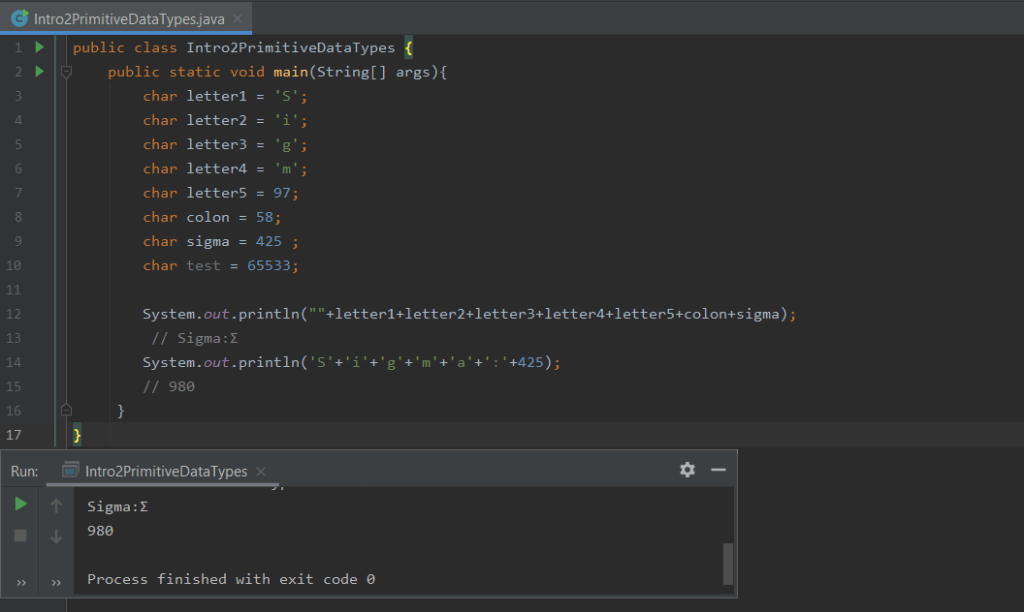
Now that we understand where numbers come from in the world of Java, we can learn where letters and symbols and how to use them. The primitive data type char are how letters (a,A,b,B,c,C, and etc), and symbols (1, 2, @, #,+, and ect) are displayed. There are two different different ways we can identify a char when we are assigning it to a variable, either we can place char in between a set of apostrophes for example ‘G’. The other way is by entering a decimal that represents the character your trying use so to see a capital G we use the decimal 71. those number come from this thing call unicode, its a giant list of every character out there and some more so if you want to use the sigma character you’d use the decimal 425 and that char will retain Σ. Now you’ll want to take a little time to take a look at the WIDE range of chars avilble (https://www.ssec.wisc.edu/~tomw/java/unicode.html#xFFF0). dont expect to memorize it because there are over 65,000 differenet chars but understanding whats going on will help a bit. In that giant list the characters for the number digits (0-9) are there, but remember they are characters not numbers, so if you add char ‘1’+’1′ you be returned the letter b witch is the 98th character (1 is the decimal 49), not the number 2 as you might have hoped for. Soon we’ll learn even more about that kinda stuff and more once we get to strings, and the example below will make even more sense.

char example

The final primitive data type is a boolean, this data type holds one of two positions, either true or false. Now its little hard to explain this to since I haven’t even told you about the if statement yet. So lets run of that real quick, an if statement basically says”If this going on then do this stuff, if that stuff in not happening then skip this stuff”. So its kinda just saying if (true) then run these statements, if (false) then skip these statements. Now you can make a boolean variable that might be true might be false, and depending on that you either run some specific code or skip it.

we havn’t covered much yet, but if you keep working hard you’ll be playing your own game of Tic Tac Toe.

Discovering the Art of Code

Discovering the New Me

My life completely changed a little more then 2 years, due to continues epileptic seizures I had a brain tumor removed, and from that my life became a new. I still retain my same interests, cares, fascinations and general understandings as before but my acute understandings of certain things where impaired. So i choose to not relearn what i lost from physics and stop advancing my degree physics mainly because it’s difficult to discover the unknowns of the unknown.

Above it may sound as if i stayed the same person, but that surgery set me free from “Plato’s cave” in ways i don’t even believe can be expressed in limited communication such as text. From that transition I wanted to learn new skills and retry skills i cared for in the past, and from trying these new and past skill, I learned that i have many new and regenerated interests, one of those being programming .

To rediscovering my care for code I was watching you tube videos and came across a you tube channel that brought my attention to the amazing functions of neural networking. After learning more of that for a while, I decided to learn to programming, jumping face first into Java. After climbing the ladder of knowledge by watching you tube videos, finding blogs, and hunting down other resources, I want to do what i can to bring simplicity to learning to code for others as well securing my knowledge by teaching sharing my understanding with others.

Design a site like this with WordPress.com
Get started